> For the complete documentation index, see [llms.txt](https://developers.raycast.com/llms.txt). Markdown versions of documentation pages are available by appending `.md` to page URLs; this page is available as [Markdown](https://developers.raycast.com/api-reference/menu-bar-commands.md).
# Menu Bar Commands
The `MenuBarExtra` component can be used to create commands which populate the [extras](https://developer.apple.com/design/human-interface-guidelines/components/system-experiences/the-menu-bar#menu-bar-commands) section of macOS' menu bar.
{% hint style="info" %}
Menubar commands aren't available on Windows.
{% endhint %}
## Getting Started
If you don't have an extension yet, follow the [getting started](/basics/getting-started.md) guide and then return to this page. Now that your extension is ready, let's open its `package.json` file and add a new entry to its `commands` array, ensuring its `mode` property is set to `menu-bar`. For this guide, let's add the following:
```json
{
"name": "github-pull-requests",
"title": "Pull Requests",
"subtitle": "GitHub",
"description": "See your GitHub pull requests at a glance",
"mode": "menu-bar"
},
```
{% hint style="info" %}
Check out the [command properties entry](/information/manifest.md#command-properties) in the manifest file documentation for more detailed information on each of those properties.
{% endhint %}
Create `github-pull-requests.tsx` in your extensions `src/` folder and add the following:
```typescript
import { MenuBarExtra } from "@raycast/api";
export default function Command() {
return (
{
console.log("seen pull request clicked");
}}
/>
{
console.log("unseen pull request clicked");
}}
/>
);
}
```
If your development server is running, the command should appear in your root search, and running the command should result in the `GitHub` icon appearing in your menu bar.

{% hint style="info" %}
macOS has the final say on whether a given menu bar extra is displayed. If you have a lot of items there, it is possible that the command we just ran doesn't show up. If that's the case, try to clear up some space in the menu bar, either by closing some of the items you don't need or by hiding them using [HiddenBar](https://github.com/dwarvesf/hidden), [Bartender](https://www.macbartender.com/), or similar apps.
{% endhint %}
Of course, our pull request command wouldn't be of that much use if we had to tell it to update itself every single time. To add [background refresh](/information/lifecycle/background-refresh.md) to our command, we need to open the `package.json` file we modified earlier and add an `interval` key to the command configuration object:
```json
{
"name": "github-pull-requests",
"title": "Pull Requests",
"subtitle": "GitHub",
"description": "See your GitHub pull requests at a glance",
"mode": "menu-bar",
"interval": "5m"
}
```
Your root search should look similar to:

Running the command activates its menu bar item. Run it again to refresh the item.
## Lifecycle
Although `menu-bar` commands can result in items permanently showing up in the macOS menu bar, they are not long-lived processes. Instead, as with other commands, Raycast loads them into memory on demand, executes their code and then tries to unload them at the next convenient time. There are five distinct events that can result in a `menu-bar`'s item being placed in the menu bar, so let's walk through each one.
### From the root search
Same as any other commands, `menu-bar` commands can be run directly from Raycast's root search. Eventually, they may result in a new item showing up in your menu bar (if you have enough room and if the command returns a `MenuBarExtra`), or in a previous item disappearing, if the command returns `null`. In this case, Raycast will load your command code, execute it, wait for the `MenuBarExtra`'s `isLoading` prop to switch to `false`, and unload the command.
{% hint style="danger" %}
If your command returns a `MenuBarExtra`, it *must* either not set `isLoading` - in which case Raycast will render and immediately unload the command, or set it to `true` while it's performing an async task (such as an API call) and then set it to `false` once it's done. Same as above, Raycast will load the command code, execute it, wait for `MenuBarExtra`'s `isLoading` prop to switch to `false`, and then unload the command.
{% endhint %}
### At a set interval
If your `menu-bar` command also makes use of [background refresh](/information/lifecycle/background-refresh.md) *and* it has background refresh activated, Raycast will run the command at set intervals. In your command, you can use `environment.launchType` to check whether it is launched in the background or by the user.
{% hint style="info" %}
To ease testing, commands configured to run in the background have an extra action in development mode:\
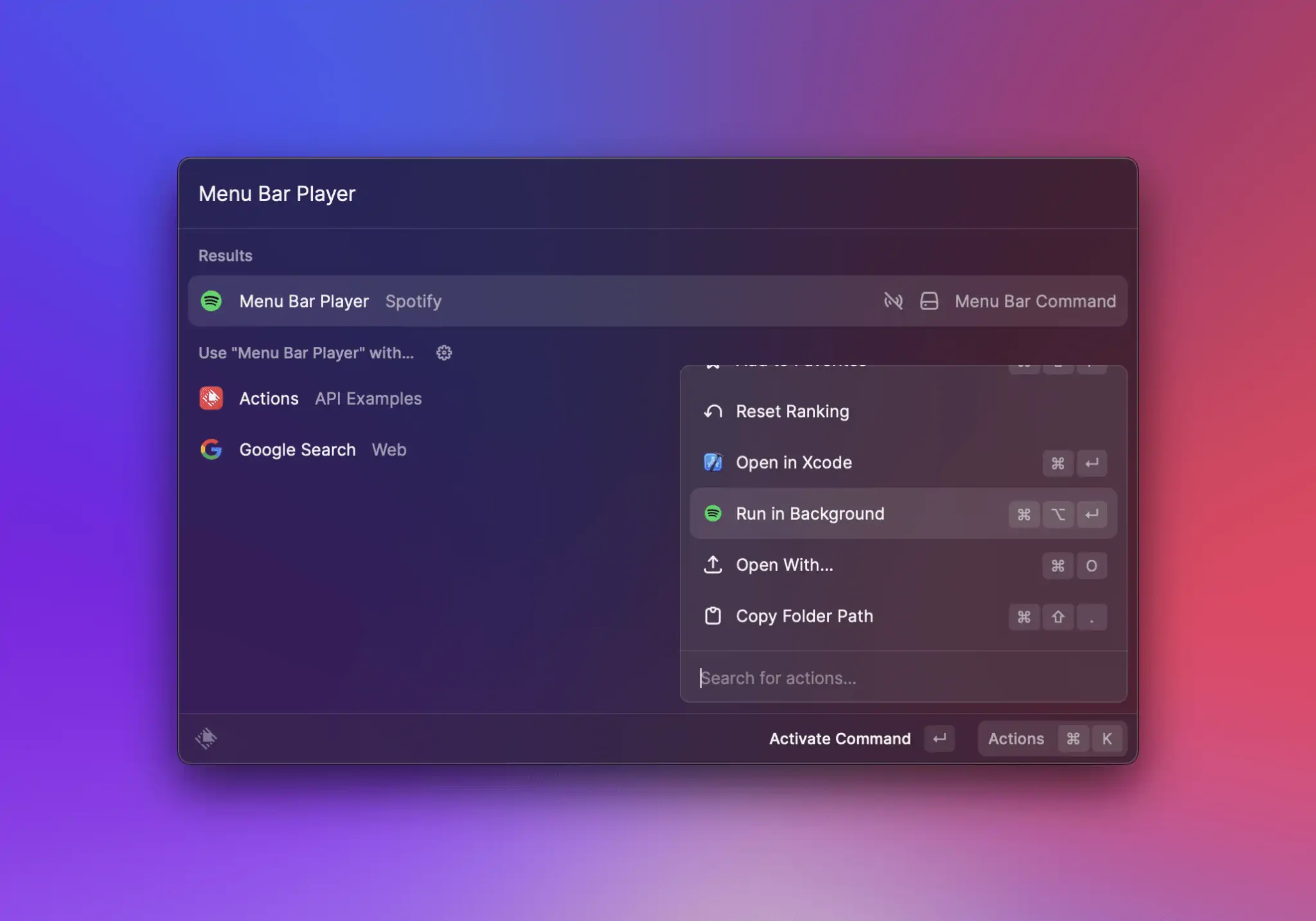
{% endhint %}
### When the user clicks the command's icon / title in the menu bar
One of the bigger differences to `view` or `no-view` commands is that `menu-bar` commands have an additional entry point: when the user clicks their item in the menu bar. If the item has a menu (i.e. `MenuBarExtra` provides at least one child), Raycast will load the command code, execute it and keep it in memory while the menu is open. When the menu closes (either by the user clicking outside, or by clicking a `MenuBarExtra.Item`), the command is then unloaded.
### When Raycast is restarted
This case assumes that your command has run at least once, resulting in an item being placed in the menu bar. If that's the case, quitting and starting Raycast again should put the same item in your menu bar. However, that item will be restored from Raycast's database - *not* by loading and executing the command.
### When a menu bar command is re-enabled in preferences
This case should work the same as when Raycast is restarted.
## Best practices
* make generous use of the [Cache API](/api-reference/cache.md) and our [Utilities](/utilities/getting-started.md) in order to provide quick feedback and ensure action handlers work as expected
* make sure you set `isLoading` to false when your command finishes executing
* avoid setting long titles in `MenuBarExtra`, `MenuBarExtra.Submenu` or `MenuBarExtra.Item`
* don't put identical `MenuBarExtra.Item`s at the same level (direct children of `MenuBarExtra` or in the same `Submenu`) as their `onAction` handlers will not be executed correctly
## API Reference
### MenuBarExtra
Adds an item to the menu bar, optionally with a menu attached in case its `children` prop is non-empty.
{% hint style="info" %}
`menu-bar` commands don't always need to return a `MenuBarExtra`. Sometimes it makes sense to remove an item from the menu bar, in which case you can write your command logic to return `null` instead.
{% endhint %}
#### Example
```typescript
import { Icon, MenuBarExtra, open } from "@raycast/api";
const data = {
archivedBookmarks: [{ name: "Google Search", url: "www.google.com" }],
newBookmarks: [{ name: "Raycast", url: "www.raycast.com" }],
};
export default function Command() {
return (
{data?.newBookmarks.map((bookmark) => (
open(bookmark.url)} />
))}
{data?.archivedBookmarks.map((bookmark) => (
open(bookmark.url)} />
))}
);
}
```
#### Props
| Prop | Description | Type | Default |
| --------- | ----------------------------------------------------------------------------------------------------------------------------------------------------------------------------------------------------------------------------------------------------------------------------- | ------------------------------------------------------------------------------------------------------------ | ------- |
| children | `MenuBarExtra.Item`s, `MenuBarExtra.Submenu`s, `MenuBarExtra.Separator` or a mix of either. | `React.ReactNode` | - |
| icon | The icon that is displayed in the menu bar. | [`Image.ImageLike`](https://developers.raycast.com/api-reference/pages/-MiwANRdFuMoKkR6at_E#image.imagelike) | - |
| isLoading | Indicates to Raycast that it should not unload the command, as it is still executing. If you set make use of `isLoading`, you need to make sure you set it to `false` at the end of the task you are executing (such as an API call), so Raycast can then unload the command. | `boolean` | - |
| title | The string that is displayed in the menu bar. | `string` | - |
| tooltip | A tooltip to display when the cursor hovers the item in the menu bar. | `string` | - |
### MenuBarExtra.Item
An item in the [MenuBarExtra](#menubarextra) or in a [MenuBarExtra.Submenu](#menubarextra.submenu).
#### Example
{% tabs %}
{% tab title="ItemWithTitle.tsx" %}
An item that only provides a `title` prop will be rendered as disabled. Use this to create section titles.
```typescript
import { Icon, MenuBarExtra } from "@raycast/api";
export default function Command() {
return (
);
}
```
{% endtab %}
{% tab title="ItemWithTitleAndIcon.tsx" %}
Similarly, an item that provides a `title` and an `icon` prop will also be rendered as disabled.
```typescript
import { Icon, MenuBarExtra } from "@raycast/api";
export default function Command() {
return (
);
}
```
{% endtab %}
{% tab title="ItemWithAction.tsx" %}
An item that provides an `onAction` prop alongside `title` (and optionally `icon`) will *not* be rendered as disabled. When users click this item in the menu bar, the action handler will be executed.
```typescript
import { Icon, MenuBarExtra, open } from "@raycast/api";
export default function Command() {
return (
open("https://raycast.com")} />
);
}
```
{% endtab %}
{% tab title="ItemWithAlternate.tsx" %}
If an item provides another `MenuBarEtra.Item` via its `alternate`, prop, the second item will be shown then the user presses the ⌥ (opt) key. There are a few limitation:
1. The `alternate` item may not have a custom shortcut. Instead, it will inherit its parent's shortcut, with the addition of ⌥ (opt) as a modifier.
2. The `alternate` item may not also specify an alternate.
3. A parent item that provides an `alternate` may not use ⌥ (opt) as a modifier.
```typescript
import { Icon, MenuBarExtra, open } from "@raycast/api";
export default function Command() {
return (
open("https://raycast.com")}
alternate={
open("https://raycast.com/store")}
/>
}
/>
);
}
```
{% endtab %}
{% endtabs %}
#### Props
| Prop | Description | Type | Default |
| --------------------------------------- | ------------------------------------------------------------------------ | ---------------------------------------------------------------------------------------------------------------- | ------- |
| title\* | The main title displayed for this item. | `string` | - |
| alternate | A MenuBarExtra.Item to be displayed when a user presses the ⌥ (opt) key. | `ReactElement<`[`MenuBarExtra.Item.Props`](#props)`, string>` | - |
| icon | An optional icon for this item. | [`Image.ImageLike`](https://developers.raycast.com/api-reference/pages/-MiwANRdFuMoKkR6at_E#image.imagelike) | - |
| onAction | An action handler called when the user clicks the item. | `(event:` [`MenuBarExtra.ActionEvent`](#menubarextra.actionevent)`) => void` | - |
| shortcut | A shortcut used to invoke this item when its parent menu is open. | [`Keyboard.Shortcut`](https://developers.raycast.com/api-reference/pages/-MlFvcN8apU1HW0IqNpC#keyboard.shortcut) | - |
| subtitle | The subtitle displayed for this item. | `string` | - |
| tooltip | A tooltip to display when the cursor hovers the item. | `string` | - |
### MenuBarExtra.Submenu
`MenuBarExtra.Submenu`s reveal their items when people interact with them. They're a good way to group items that naturally belong together, but keep in mind that submenus add complexity to your interface - so use them sparingly!
#### Example
{% tabs %}
{% tab title="Bookmarks.tsx" %}
```typescript
import { Icon, MenuBarExtra, open } from "@raycast/api";
export default function Command() {
return (
open("https://raycast.com")} />
open("https://github.com/pulls")} />
open("https://github.com/issues")} />
);
}
```
{% endtab %}
{% tab title="DisabledSubmenu.tsx" %}
Submenus with no children will show up as disabled.
```typescript
import { Icon, MenuBarExtra, open } from "@raycast/api";
export default function Command() {
return (
);
}
```
{% endtab %}
{% endtabs %}
#### Props
| Prop | Description | Type | Default |
| --------------------------------------- | ------------------------------------------------------------------------------------------- | ------------------------------------------------------------------------------------------------------------ | ------- |
| title\* | The main title displayed for this submenu. | `string` | - |
| children | `MenuBarExtra.Item`s, `MenuBarExtra.Submenu`s, `MenuBarExtra.Separator` or a mix of either. | `React.ReactNode` | - |
| icon | An optional icon for this submenu. | [`Image.ImageLike`](https://developers.raycast.com/api-reference/pages/-MiwANRdFuMoKkR6at_E#image.imagelike) | - |
### MenuBarExtra.Section
An item to group related menu items. It has an optional title and a separator is added automatically between sections.
#### Example
```typescript
import { Icon, MenuBarExtra, open } from "@raycast/api";
const data = {
archivedBookmarks: [{ name: "Google Search", url: "www.google.com" }],
newBookmarks: [{ name: "Raycast", url: "www.raycast.com" }],
};
export default function Command() {
return (
{data?.newBookmarks.map((bookmark) => (
open(bookmark.url)} />
))}
{data?.archivedBookmarks.map((bookmark) => (
open(bookmark.url)} />
))}
);
}
```
#### Props
| Prop | Description | Type | Default |
| -------- | --------------------------------- | ----------------- | ------- |
| children | The item elements of the section. | `React.ReactNode` | - |
| title | Title displayed above the section | `string` | - |
## Types
### MenuBarExtra.ActionEvent
An interface describing Action events in callbacks.
#### Properties
| Property | Description | Type |
| -------------------------------------- | --------------------------------------------------------------------------------------------------------------------------------------------------------------------------------- | --------------------------------- |
| type\* | A type of the action event \* `left-click` is a left mouse click on the MenuBarExtra.Item or a Keyboard.Shortcut \* `right-click` is a right mouse click on the MenuBarExtra.Item | `"left-click"` or `"right-click"` |
#### Example
```typescript
import { MenuBarExtra } from "@raycast/api";
export default function Command() {
return (
console.log("Action Event Type", event.type)}
/>
);
}
```
---
# Agent Instructions
This documentation is published with GitBook. GitBook is the documentation platform designed so that both humans and AI agents can read, navigate, and reason over technical content effectively. Learn more at gitbook.com.
## Querying This Documentation
If you need additional information that is not directly available in this page, you can query the documentation by asking a question.
Perform an HTTP GET request on the following URL with the `ask` and `goal` query parameters:
```
GET https://developers.raycast.com/api-reference/menu-bar-commands.md?ask=&goal=
```
`ask` is the immediate question: it should be specific, self-contained, and written in natural language.
`goal` is what the user is ultimately trying to achieve, the reason they need the answer. Sharing it helps GitBook give you a better, more relevant answer. A goal is most helpful when it describes the outcome the user wants rather than restating the question. For example, with `ask=how do I create an API token`, a goal like `automate deployments from our CI pipeline` lets GitBook tailor the answer to that use case.
The response will contain a direct answer to the question and relevant excerpts and sources from the documentation.
Use this mechanism when the answer is not explicitly present in the current page, you need clarification or additional context, or you want to retrieve related documentation sections.